This short guide shows how to:
-
Completely disable WordPress update pings and pingbacks (Method 1)
-
Optionally disable XML-RPC entirely — only if you don’t use Jetpack, remote publishing, or mobile app connections (Method 2)
⚠️ Always test on a staging site or take a backup before changing production files.
Why disable pings?
- When a post is published, WordPress sends out XML-RPC pings to every URL listed in Settings → Writing → Update Services.
- If those external services are unreachable (blocked, filtered, or deprecated), your server may wait on timeouts — causing slow publishes and higher CPU/RAM usage.
- Many ping services are obsolete and no longer useful for modern search engines; sitemaps and direct APIs (IndexNow, Search Console) are the reliable ways to notify crawlers today.
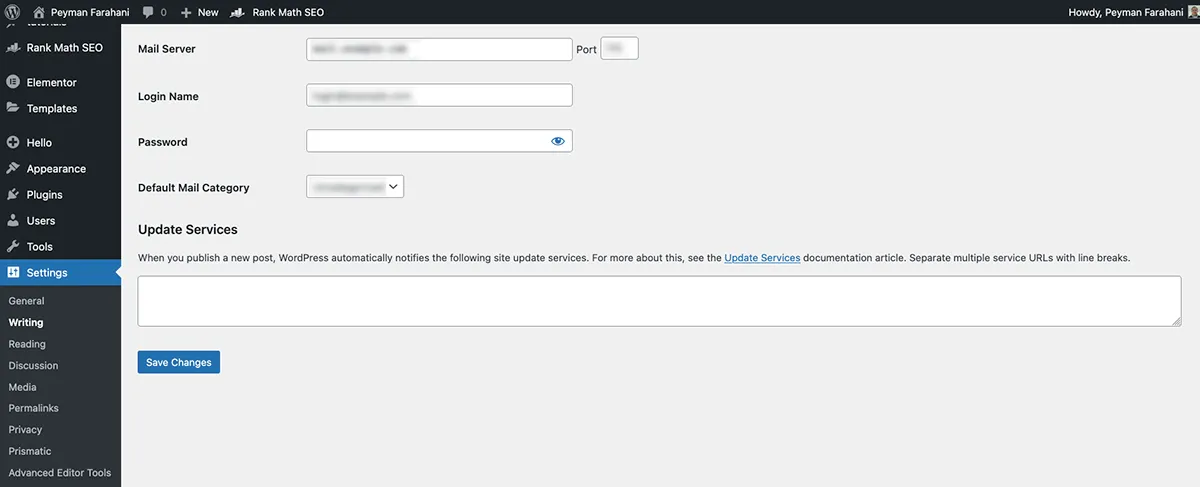
Method 1 — Disable all WordPress pings, pingbacks and related functions
What this does
-
Prevents WordPress from trying to notify external update services.
-
Disables pingbacks (incoming) to reduce spam/attacks.
-
Removes the internal actions that trigger pings when publishing or updating posts.
Where to put it
Add to your theme’s functions.php
/**
 * Disable WordPress pings and pingbacks (safe for news sites)
 *
 * What it does:
 *  - Clears the update services list
 *  - Prevents automatic pings when publishing/updating posts
 *  - Removes pingback XML-RPC methods to stop incoming pingbacks
 *  - Keeps XML-RPC enabled by default (unless you choose Method 3)
 */

/* 1) Ensure default pingback flag is off (UI checkbox default) */
add_filter( 'option_default_pingback_flag', '__return_false' );
add_filter( 'pre_option_default_pingback_flag', '__return_zero' );

/* 2) Make the Update Services option empty (so WP doesn't try to call remote URLs) */
add_filter( 'option_ping_sites', '__return_empty_string' );
add_filter( 'pre_option_ping_sites', '__return_empty_string' );

/* 3) Prevent WordPress from performing scheduled/automatic pings */
remove_action( 'do_pings', 'do_all_pings' );
remove_action( 'publish_post', 'generic_ping' );
remove_action( 'publish_future_post', 'generic_ping' );

/* 4) Disable pingback XML-RPC methods (prevents incoming pingback abuse) */
add_filter( 'xmlrpc_methods', function( $methods ) {
    if ( isset( $methods['pingback.ping'] ) ) {
        unset( $methods['pingback.ping'] );
    }
    if ( isset( $methods['pingback.extensions.getPingbacks'] ) ) {
        unset( $methods['pingback.extensions.getPingbacks'] );
    }
    return $methods;
});
Notes
This code does not disable XML-RPC itself (so plugins that rely on XML-RPC may continue to work).
The code prevents WordPress from sending pings and removes the pingback entrypoints that are commonly abused.
Download the Free Plugin to Disable WordPress pings Instantly
Instead of adding custom code, you can install a lightweight plugin I’ve developed specifically for this purpose — clean, minimal, and safe to use.
If you’d like, you can visit the GitHub releases page to get the latest version.
Method 2 — Optional: disable XML-RPC entirely
When to use
-
Use this only if you are sure you do not use Jetpack, the WordPress mobile app, remote publishing, or any plugin that relies on xmlrpc.php.
-
Disabling XML-RPC removes an entire legacy API endpoint but may break integrations that rely on it.
One-line code to disable XML-RPC
// Disable XML-RPC completely (only if you don't use Jetpack / mobile app / remote publish)
add_filter( 'xmlrpc_enabled', '__return_false' );
Additional tips for news sites
-
Rely on a sitemap and submit it to Search Console (Google) and Bing Webmaster Tools. That’s the reliable way to prompt re-indexing.
-
Consider implementing IndexNow (supported by Bing and Yandex) via a small plugin or your SEO plugin (Rank Math supports it). IndexNow is far more efficient and server-friendly than XML-RPC pings.
-
Monitor server logs for
cURL error 28or long PHP execution times triggered around publish events — that’s a sign pings are timing out.
Does disabling pings affect SEO?
No — disabling pings has zero negative impact on SEO. Modern search engines (like Google and Bing) no longer rely on XML-RPC “ping” notifications. Instead, they use sitemaps, internal/external links, and indexing APIs to discover new content.
By turning off legacy ping services, you actually prevent unnecessary timeouts and server load without affecting how fast your posts are indexed.
This makes your site more stable and faster, especially for news or high-volume publishing environments.